
Online
AI-Assisted Legacy (Brownfield) Software Development with GitHub Copilot
Revolutionize your software development with GitHub Copilot in this comprehensive remote training for developers, technical leads, and engineering managers. Over five half-day sessions, you will gain hands-on experience mastering AI-assisted coding fundamentals and safe legacy code modernization. Learn to implement enterprise governance, enhance code quality, and boost productivity through practical AI workflows, automated testing, and prompt engineering techniques. Whether you’re looking to modernize existing systems or deliver new features, this class equips you with essential strategies and templates to harness AI effectively while managing risk and technical debt. Register for this course to transform your team’s software engineering approach and stay ahead in the AI-powered development revolution.
This is an online event.
Click here to register for this event!
Transform Your Development Workflow with GitHub Copilot and Advanced AI Tools Master the future of software engineering through a comprehensive training class designed for modern development teams.
- Duration: Five half-days of 4 hours each (20 hours total). Note that hours are shown in the Central time zone.
- Delivery: Remote (instructor in California; students distributed, class size 6–15)
- Audience: Software developers who are familiar with GitHub and Copilot novices
Who Should Attend
Software developers, technical leads, and engineering managers ready to leverage AI for accelerated development, legacy system modernization, and greenfield project creation. You should have some experience using ChatGPT, Claude, or a similar LLM, plus some familiarity with GitHub Copilot and software development fundamentals.
What You'll Learn
The first three days of AI-Assisted Development Fundamentals lay a practical foundation for developers ready to work smarter with AI. Day one dives straight into hands-on coding — setting up tools, building a real C# project using GitHub Copilot, and mastering TDD, CI/CD pipelines, and AI instruction files. Day two broadens the picture with deeper coverage of LLM concepts, prompt engineering, documentation generation, and AI-driven testing strategies, giving you the frameworks to integrate AI responsibly across your entire development workflow. By day three, you're building custom AI agents, defining skills, and connecting Model Context Protocol (MCP) servers — putting you in control of a fully tailored, AI-powered development environment.
Legacy Code Transformation Day four puts AI to work on real-world legacy codebases. You'll learn how to safely assess and protect brownfield code, use AI to identify technical debt — from outdated patterns and security vulnerabilities to missing tests and architectural drift — and build a prioritized backlog in about an hour. Hands-on exercises walk you through implementing fixes, managing pull requests, and comparing AI model outputs to find the most effective solutions.
Greenfield Development The final day brings it all together with an AI-first approach to greenfield development. You'll follow a structured workflow — from generating business requirements and building tech stack instruction files to architecting with vertical slices and implementing features with AI-generated prompts. Live coding exercises walk you through the full cycle: implementation, pull requests, and AI-assisted code review — leaving you with a repeatable, production-ready methodology for building new applications with AI from the ground up.
Why This Training Matters The AI development era is happening now. Developers using AI tools report 30–50% productivity gains, but only when used correctly. This training teaches you to harness AI as a force multiplier while avoiding common pitfalls that lead to poor code quality and technical debt.
You'll gain:
- Immediate productivity improvements through proper AI tool usage
- Enterprise-ready governance frameworks for team adoption
- Risk management strategies for production environments
- Template libraries and workflows for ongoing success
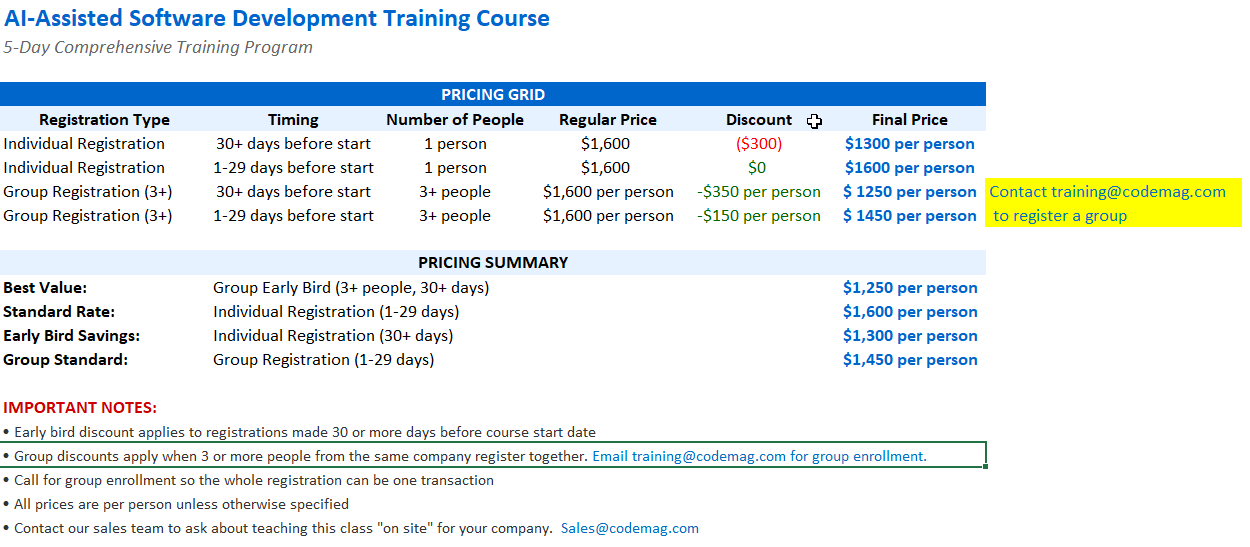
Cost Matrix
What's the Tech Stack for this Class?
- IDE: VS Code with the GitHub Copilot Extension
- SCC: GitHub
- Coding languages: C#, TypeScript, Vue.js
- Installation instructions: See this blog.
NOTE: The emphasis is on AI assistance and how to use AI effectively to generate code. The techniques are implementable in any tech stack. You are expected to have a bit of familiarity with VS Code and enough experience with GitHub to be able to clone a repository, but ask if you need help.
Training 5+ developers? Let's customize it.
Our AI-assisted development techniques work with any tech stack—but they're even more powerful when taught using your actual tools and project types. We'll tailor the class to your team's real-world needs.
Session Agenda:
| Monday, March 23, 2026 | |
| 10:00AM to 10:15AM | Introductions & Welcome |
| 10:15AM to 10:45AM | AI-Assisted Development Philosophy, Repository and Tool Setup, GitHub Copilot UI Tour |
| 10:45AM to 11:30AM | Lab: Calculator Project - Setup & Basic Implementation |
| 11:30AM to 12:00PM | Foundations of Using AI in Software Development |
| 12:00PM to 1:00PM | 60-minute Break |
| 1:00PM to 1:15PM | Code Quality Analysis |
| 1:15PM to 1:30PM | Evergreen Code Concepts |
| 1:30PM to 2:15PM | Core Instruction Files & Provenance Tracking + Organizational vs. Repository Instruction Files |
| 2:15PM to 2:30PM | Exercise: Technology Inventory & Instruction Generation |
| 2:30PM to 2:45PM | Copilot Instruction Files and Context Management |
| 2:45PM to 3:00PM | Creating Instruction Files with Sessions + Managing Instruction Files & Context Windows |
| Tuesday, March 24, 2026 | |
| 10:00AM to 10:15AM | Welcome back, questions, agenda + GitHub Copilot Pricing & Licensing |
| 10:15AM to 10:30AM | VS Code Configuration Tips + LLMs + GitHub Copilot for Teams Key Considerations |
| 10:30AM to 11:00AM | Model Selection and Capabilities + Safety Measures & Best Practices |
| 11:00AM to 11:15AM | Managing Copilot & Context + Prompt Files |
| 11:15AM to 11:30AM | Hands-On Exercise: Creating Prompt Files |
| 11:30AM to 12:00PM | Creating Instruction Files from Prompts |
| 12:00PM to 1:00PM | 60-minute Break |
| 1:00PM to 1:15PM | Documentation Generation |
| 1:15PM to 1:30PM | Architecture Diagrams with Mermaid |
| 1:30PM to 1:45PM | Code Explanation and Analysis |
| 1:45PM to 2:00PM | Code Translation and Technical Hotspot Analysis + Azure DevOps & GitHub Copilot Extensions |
| 2:00PM to 2:15PM | Create a GH Personal Access Token + Test Automation & Code Quality |
| 2:15PM to 2:30PM | Test Generation Capabilities + Prompt Guidance Discussion |
| 2:30PM to 2:45PM | Testing Frameworks |
| 2:45PM to 3:00PM | Feature Flags and Test Suites + Testing in Production |
| Wednesday, March 25, 2026 | |
| 10:00AM to 10:15AM | Welcome back, questions, agenda |
| 10:15AM to 10:30AM | Custom Agents |
| 10:30AM to 10:45AM | Skills |
| 10:45AM to 11:15AM | Exercise: Building Custom Agents |
| 11:15AM to 12:00PM | Exercise: Defining Skills |
| 12:00PM to 1:00PM | 60-minute Break |
| 1:00PM to 1:15PM | Agent Best Practices |
| 1:15PM to 1:30PM | MCP (Model Context Protocol) Servers |
| 1:30PM to 2:15PM | Exercise: MCP Servers |
| Thursday, March 26, 2026 | |
| 10:00AM to 10:15AM | Welcome back, questions, agenda |
| 10:15AM to 10:30AM | AI Practitioner Resources Overview |
| 10:30AM to 10:45AM | Fork Repository |
| 10:45AM to 11:00AM | Protecting Brownfield Code Bases |
| 11:00AM to 11:15AM | AI Implementation Workflow |
| 11:15AM to 11:30AM | Effective Prompts for Technical Debt |
| 11:30AM to 12:15PM | Building a Backlog - Technical Debt Identification |
| 12:15PM to 1:15PM | 60-minute Break |
| 1:15PM to 1:30PM | Prioritization & Issue Management |
| 1:30PM to 1:45PM | Addressing Technical Debt |
| 1:45PM to 2:30PM | Lab: Student implementation practice |
| 2:30PM to 3:00PM | Multi-Implementation Comparison |
| Friday, March 27, 2026 | |
| 10:00AM to 10:15AM | Welcome back, questions, agenda |
| 10:15AM to 10:30AM | AI-First Development Methodology + Session Transition and Preview |
| 10:30AM to 10:45AM | Greenfield Development Workflow + AI-Assisted Workflow Pattern |
| 10:45AM to 11:00AM | Business Requirements Generation Exercise |
| 11:00AM to 11:15AM | Technology Stack Instruction Files |
| 11:15AM to 11:30AM | Vertical Slicing Architecture Introduction |
| 11:30AM to 11:45AM | Creating Vertical Slice Implementation Plans |
| 11:45AM to 12:00PM | Dependency Analysis and Planning |
| 12:00PM to 12:15PM | Vertical Slice Review + Issue Identification & Diagram Corrections |
| 12:15PM to 1:15PM | 60-minute Break |
| 1:15PM to 1:30PM | Implementation Prompts and Verification |
| 1:30PM to 2:00PM | Vertical Slice Implementation |
| 2:00PM to 2:15PM | Pull Request and Code Review |
| 2:15PM to 2:30PM | Slice 4 Showcase - Order of Operations + GitHub Code Review with Copilot |
| 2:30PM to 2:45PM | Slice 3 Showcase - Clear Button |
| 2:45PM to 3:00PM | GitHub CLI & PR Management |
| 3:00PM to 3:15PM | Adoption Strategy |
| Monday, March 23, 2026 |
| Online Course |
| 10:00AM to 10:15AM Introductions & Welcome |
| 10:15AM to 10:45AM AI-Assisted Development Philosophy, Repository and Tool Setup, GitHub Copilot UI Tour |
| 10:45AM to 11:30AM Lab: Calculator Project - Setup & Basic Implementation |
| 11:30AM to 12:00PM Foundations of Using AI in Software Development |
| 12:00PM to 1:00PM 60-minute Break |
| 1:00PM to 1:15PM Code Quality Analysis |
| 1:15PM to 1:30PM Evergreen Code Concepts |
| 1:30PM to 2:15PM Core Instruction Files & Provenance Tracking + Organizational vs. Repository Instruction Files |
| 2:15PM to 2:30PM Exercise: Technology Inventory & Instruction Generation |
| 2:30PM to 2:45PM Copilot Instruction Files and Context Management |
| 2:45PM to 3:00PM Creating Instruction Files with Sessions + Managing Instruction Files & Context Windows |
| Tuesday, March 24, 2026 |
| Online Course |
| 10:00AM to 10:15AM Welcome back, questions, agenda + GitHub Copilot Pricing & Licensing |
| 10:15AM to 10:30AM VS Code Configuration Tips + LLMs + GitHub Copilot for Teams Key Considerations |
| 10:30AM to 11:00AM Model Selection and Capabilities + Safety Measures & Best Practices |
| 11:00AM to 11:15AM Managing Copilot & Context + Prompt Files |
| 11:15AM to 11:30AM Hands-On Exercise: Creating Prompt Files |
| 11:30AM to 12:00PM Creating Instruction Files from Prompts |
| 12:00PM to 1:00PM 60-minute Break |
| 1:00PM to 1:15PM Documentation Generation |
| 1:15PM to 1:30PM Architecture Diagrams with Mermaid |
| 1:30PM to 1:45PM Code Explanation and Analysis |
| 1:45PM to 2:00PM Code Translation and Technical Hotspot Analysis + Azure DevOps & GitHub Copilot Extensions |
| 2:00PM to 2:15PM Create a GH Personal Access Token + Test Automation & Code Quality |
| 2:15PM to 2:30PM Test Generation Capabilities + Prompt Guidance Discussion |
| 2:30PM to 2:45PM Testing Frameworks |
| 2:45PM to 3:00PM Feature Flags and Test Suites + Testing in Production |
| Wednesday, March 25, 2026 |
| Online Course |
| 10:00AM to 10:15AM Welcome back, questions, agenda |
| 10:15AM to 10:30AM Custom Agents |
| 10:30AM to 10:45AM Skills |
| 10:45AM to 11:15AM Exercise: Building Custom Agents |
| 11:15AM to 12:00PM Exercise: Defining Skills |
| 12:00PM to 1:00PM 60-minute Break |
| 1:00PM to 1:15PM Agent Best Practices |
| 1:15PM to 1:30PM MCP (Model Context Protocol) Servers |
| 1:30PM to 2:15PM Exercise: MCP Servers |
| Thursday, March 26, 2026 |
| Online Course |
| 10:00AM to 10:15AM Welcome back, questions, agenda |
| 10:15AM to 10:30AM AI Practitioner Resources Overview |
| 10:30AM to 10:45AM Fork Repository |
| 10:45AM to 11:00AM Protecting Brownfield Code Bases |
| 11:00AM to 11:15AM AI Implementation Workflow |
| 11:15AM to 11:30AM Effective Prompts for Technical Debt |
| 11:30AM to 12:15PM Building a Backlog - Technical Debt Identification |
| 12:15PM to 1:15PM 60-minute Break |
| 1:15PM to 1:30PM Prioritization & Issue Management |
| 1:30PM to 1:45PM Addressing Technical Debt |
| 1:45PM to 2:30PM Lab: Student implementation practice |
| 2:30PM to 3:00PM Multi-Implementation Comparison |
| Friday, March 27, 2026 |
| Online Course |
| 10:00AM to 10:15AM Welcome back, questions, agenda |
| 10:15AM to 10:30AM AI-First Development Methodology + Session Transition and Preview |
| 10:30AM to 10:45AM Greenfield Development Workflow + AI-Assisted Workflow Pattern |
| 10:45AM to 11:00AM Business Requirements Generation Exercise |
| 11:00AM to 11:15AM Technology Stack Instruction Files |
| 11:15AM to 11:30AM Vertical Slicing Architecture Introduction |
| 11:30AM to 11:45AM Creating Vertical Slice Implementation Plans |
| 11:45AM to 12:00PM Dependency Analysis and Planning |
| 12:00PM to 12:15PM Vertical Slice Review + Issue Identification & Diagram Corrections |
| 12:15PM to 1:15PM 60-minute Break |
| 1:15PM to 1:30PM Implementation Prompts and Verification |
| 1:30PM to 2:00PM Vertical Slice Implementation |
| 2:00PM to 2:15PM Pull Request and Code Review |
| 2:15PM to 2:30PM Slice 4 Showcase - Order of Operations + GitHub Code Review with Copilot |
| 2:30PM to 2:45PM Slice 3 Showcase - Clear Button |
| 2:45PM to 3:00PM GitHub CLI & PR Management |
| 3:00PM to 3:15PM Adoption Strategy |